Training home / Reports guide
Which report answers which question
Every report in WorkCrest, what it shows, who can open it, and how to change the period or export it.
- Who it is for: anyone who needs to find the right report or understand a number on it.
- What you can do: pick a report by question, change the period, and export a table.
- What you need first: access to the report area (some figures, such as costs, need extra permission).
Question to report
Start here. Find your question, open the screen shown under "Where to find it". "Who can open it" lists the roles that get the screen by default; an Admin can change this at Administration, Page Access, and Admin can always open everything.
| Question | Report | Where to find it | Who can open it (default) |
|---|---|---|---|
| Who are my biggest customers, parts or months by sales? | Sales Analysis | Accounts, Plant Head | |
| Where does my purchasing spend go? | Purchase Analysis | Accounts, Plant Head | |
| Which customers pay late, and by how many days? | Collection Days | Accounts, Plant Head | |
| Which parts or suppliers are being rejected, returned or scrapped? | Rejections & Scrap | Plant Head, Procurement, Accounts, Sales, Quality | |
| Where is that purchase order, bill, invoice, payment, receipt or challan? | Document Register | Accounts | |
| What GST did we charge and pay, month by month? | GST Summary | Accounts, Plant Head | |
| What HSN/SAC codes did we sell under? | HSN Summary | Accounts, Plant Head | |
| List every sales invoice and credit note for the period | Sales Register | Accounts, Plant Head | |
| What input tax is on our supplier bills? | ITC Register | Accounts, Plant Head | |
| Who is close to or over their credit limit? | Credit Utilisation | Accounts, Plant Head | |
| What have customers ordered that we have not yet shipped? | Open Order Book | Sales, Accounts, Plant Head | |
| Do we ship on the date we promised? | On-time Delivery | Sales, Accounts, Plant Head | |
| Do suppliers deliver on the date they promised? | Supplier Delivery | Procurement, Accounts, Plant Head | |
| How has the price we pay for a part changed? | Purchase Price History | Procurement, Accounts, Plant Head | |
| What did production complete? | Completed Operations | Plant Head, Accounts | |
| What is our stock worth, and what is not moving? | Stock Valuation | Accounts | |
| Which sales prices were re-worked or overridden, and which index rates moved? | Price Revisions, Price Overrides, Index Rates | , , | Sales, Accounts, Plant Head |
| Are we making good product first time? Which defects recur? | Quality report | Same as Rejections & Scrap (Quality module must be on) | |
| How is each supplier performing on quality? | Supplier Quality | Same as Rejections & Scrap (Quality module must be on) | |
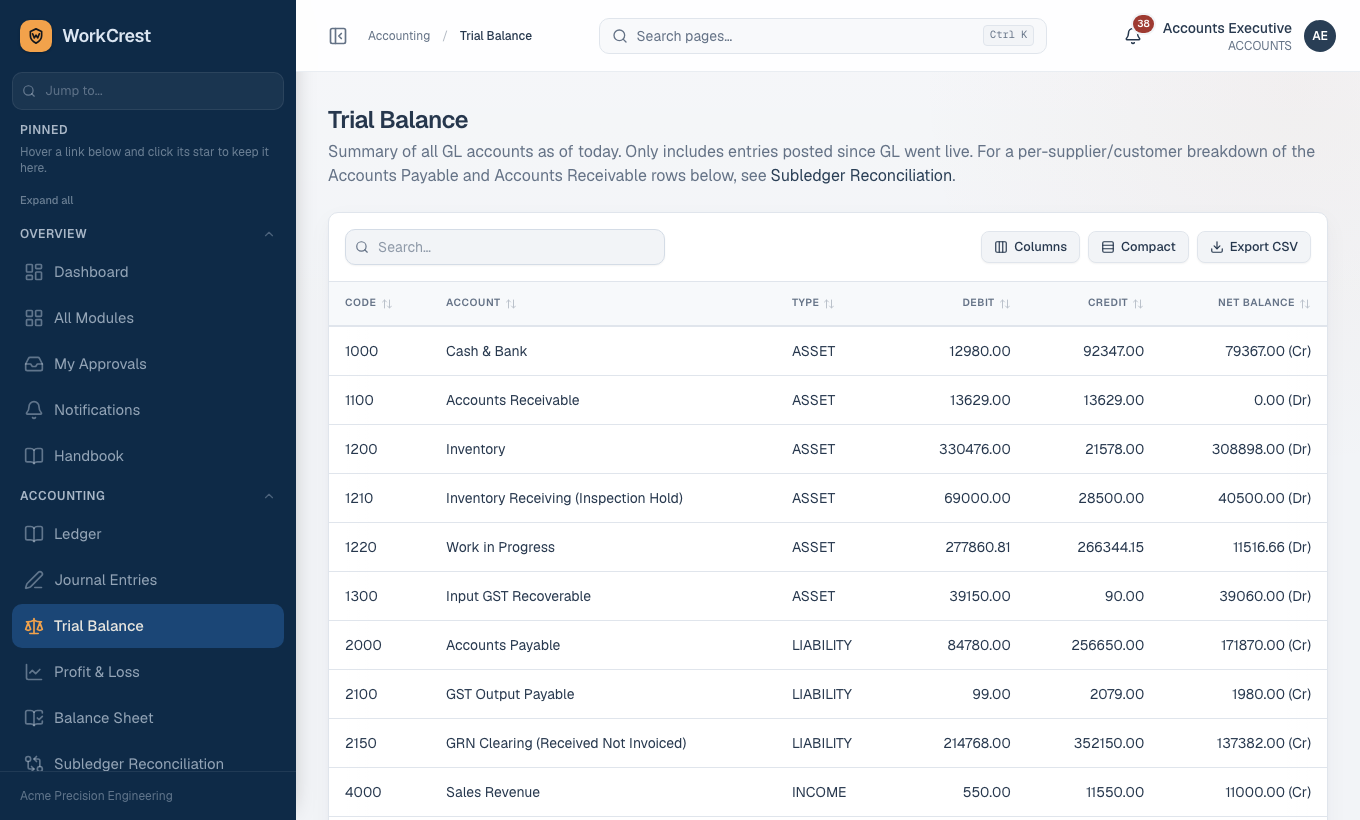
| What does every account hold? Is the ledger balanced? | Ledger, Trial Balance | , | Accounts |
| Income less expense for a period? Assets against liabilities? | Profit & Loss, Balance Sheet | , | Accounts |
| Do the supplier and customer balances agree with the ledger? | Subledger Reconciliation | Accounts | |
| Which goods have we received but not yet been billed for? | Open GRN Clearing | Accounts | |
| Who owes us, and how overdue? | Receivables Ageing, Customer statement | , | Accounts, Sales |
| Whom do we owe, and how overdue? | Payables Ageing, Supplier ledger | , | Accounts |
How every report works
Period
Most reports have two date boxes, Period from and Period to, and an Apply button.
- Bookmark a period. The dates also live in the web address, for example
?from=2026-04-01&to=2026-10-22. Bookmark or share that link. - Default period. With no dates, the business, insight and rejection reports run from 1 April of this financial year to today.
- "To" is inclusive. It includes the whole of that day.
Not every report follows this: the Document Register and Profit & Loss default to the last 30 days, the Balance Sheet uses a single "as of" date, and the Trial Balance is as of today. The ageing reports have no date selector.
Grouping
Some reports offer tabs above the table that change how rows are grouped. The choice is kept in the address as ?by=. Changing the dates keeps your grouping.
Export to CSV
Every table has an Export CSV button in its toolbar. It exports the rows currently in the table (after any search or filter you applied), with the same columns. Every export is recorded for Admins. Click a column heading to sort.
Cost columns
Internal cost (standard cost) is shown only to people holding the view-costs permission, by default Accounts and Admin. For everyone else the cost columns are not just hidden; the values are never sent to the browser.
Sales Analysis
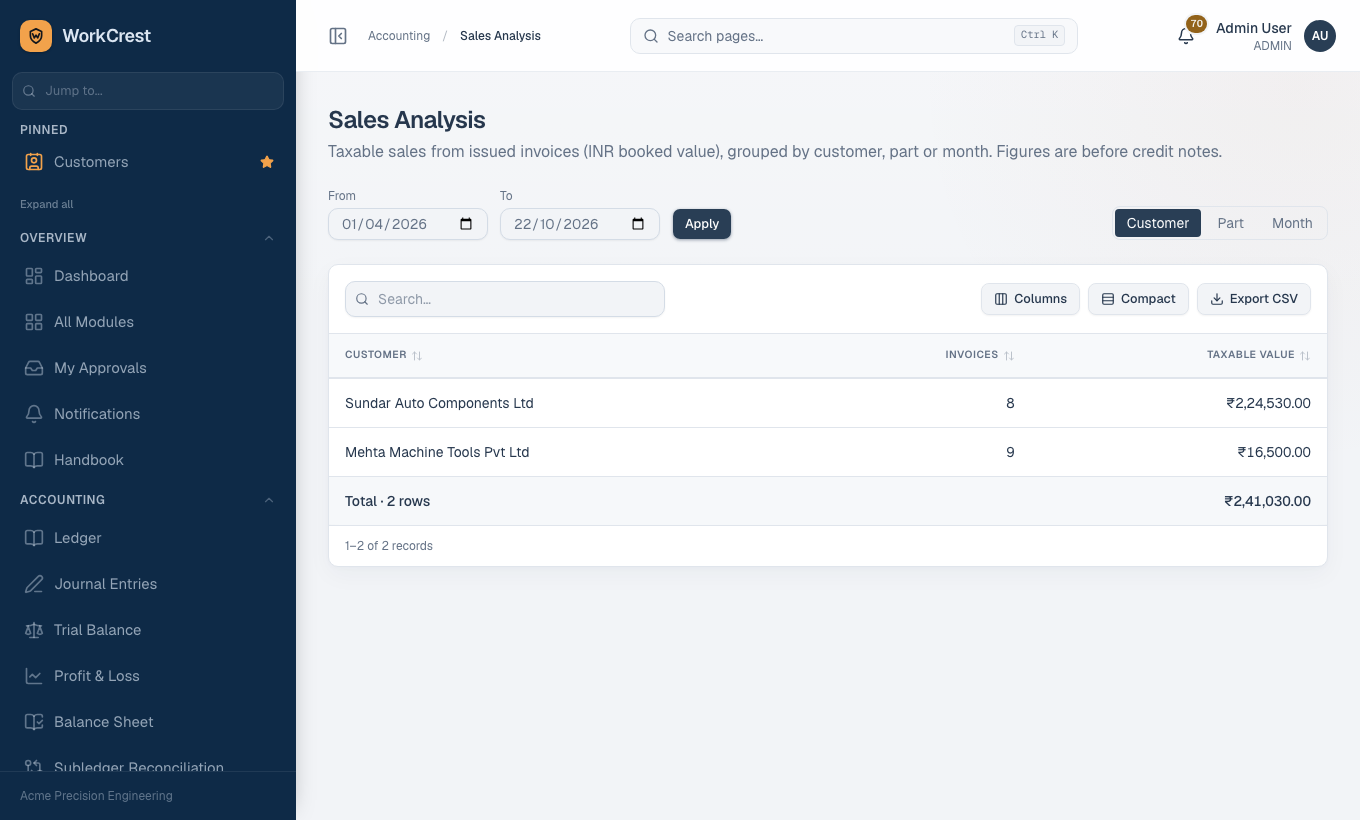
Open . It shows taxable sales from issued invoices, in rupees at the booked value, before credit notes. Draft invoices are not counted.
- Group tabs: Customer, Part or Month (
?by=party,part,month). Customer is the default. - Columns: the group (Customer, Part or Month), Invoices (how many), and Taxable value, with a total at the foot.
- Use it for: ranking customers, spotting a part that sells poorly, seeing which month was strong.
Purchase Analysis
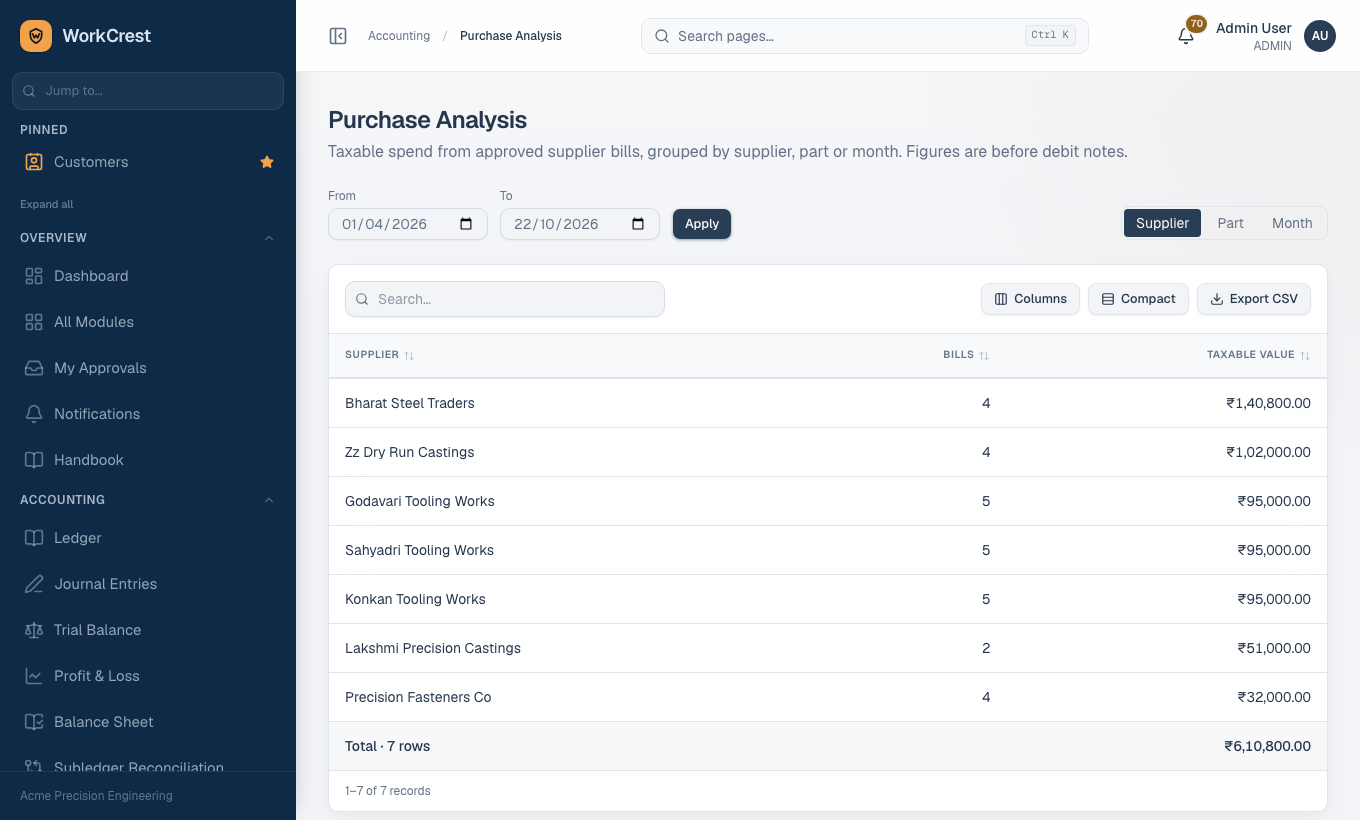
Open . It is the mirror image for buying: taxable spend from approved supplier bills, before debit notes.
- Group tabs: Supplier, Part or Month.
- Columns: the group, Bills, and Taxable value, with a total.
- Use it for: finding the suppliers you depend on, and what you spend on each part.
Collection Days
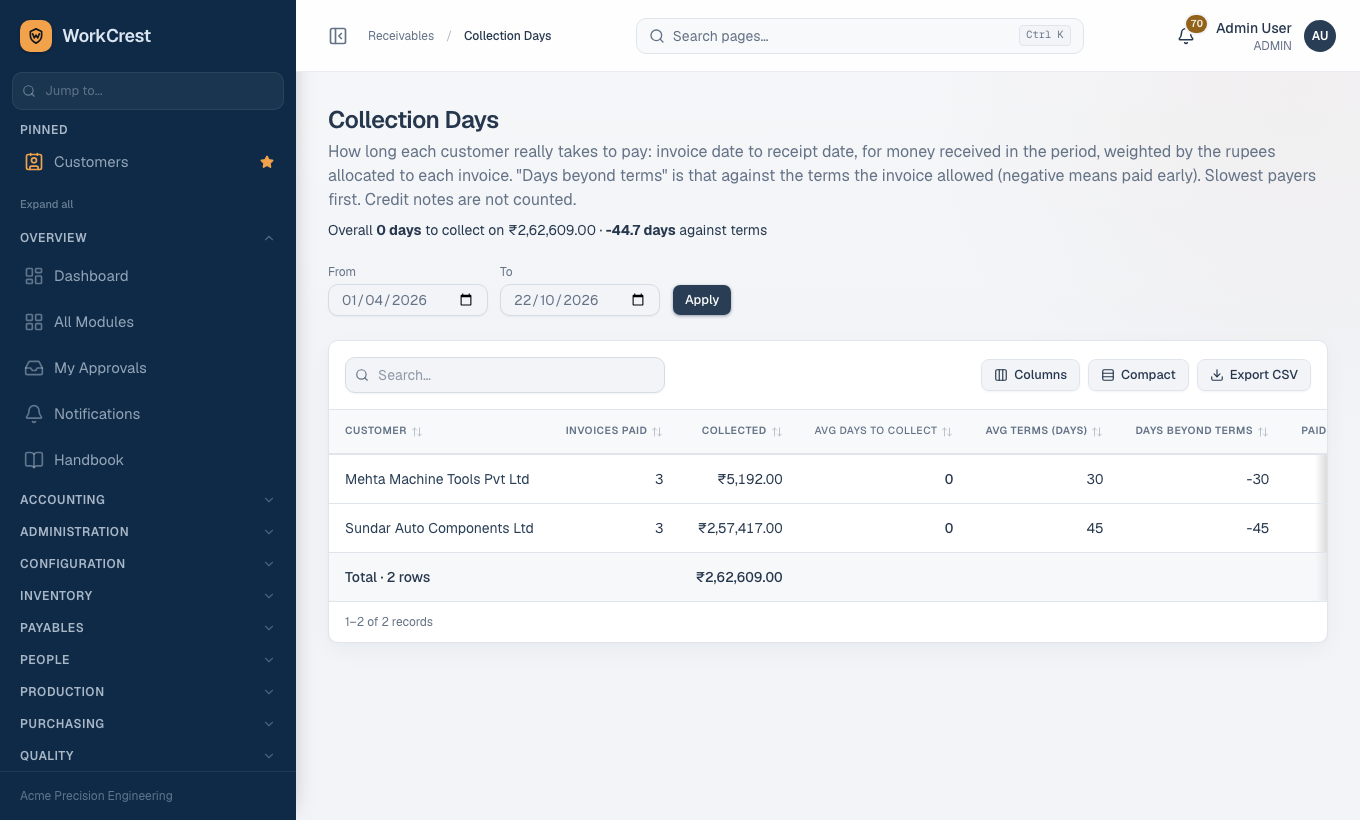
Open . It tells you how long each customer really takes to pay. Slowest payers come first.
- What it measures. For money received in the period, it counts days from the invoice date to the receipt date.
- Weighting. Each invoice counts by the rupees allocated to it.
- Comparison. The result is compared with the payment terms the invoice allowed.
- Columns: Customer (links to the customer statement), Invoices paid, Collected, Avg days to collect, Avg terms (days), Days beyond terms, Paid late (%).
- Days beyond terms: a red plus figure means they pay after the due date; a negative figure means they pay early.
- A summary line above the table gives the overall days to collect on the total collected and the overall days against terms.
- Only the Period selector applies; there is no grouping.
Rejections & Scrap
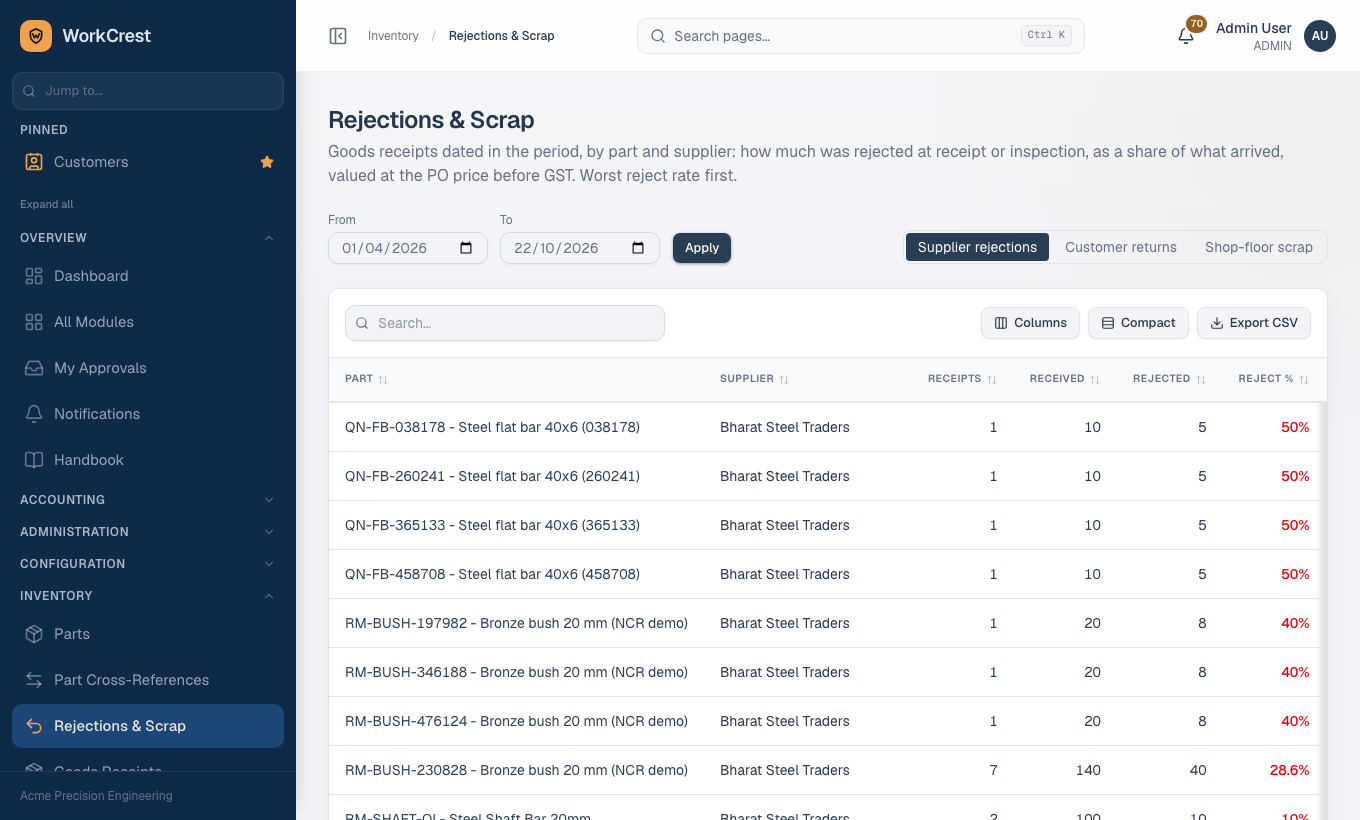
Open . One screen, three views, chosen by the tabs (?by=incoming, customer, scrap):
Supplier rejections
Goods receipts dated in the period, by part and supplier, valued at the PO price before GST. Worst reject rate first.
Columns: Part, Supplier, Receipts, Received, Rejected, Reject %, Rejected value, Main reason.
Customer returns
Approved sales returns dated in the period, by part, against what was dispatched in the same period. Read it as the return rate for the period, not for the goods' whole life.
Columns: Part, Returns, Customers, Returned, Dispatched, Return %, Returned value (cost), Main reason.
Shop-floor scrap
Scrap recorded on job steps in the period, by the part the job makes, as a share of the planned quantity of the jobs involved.
Columns: Part, Jobs, Planned, Scrapped, Scrap %, Scrap value (std cost), Main step, Main reason.
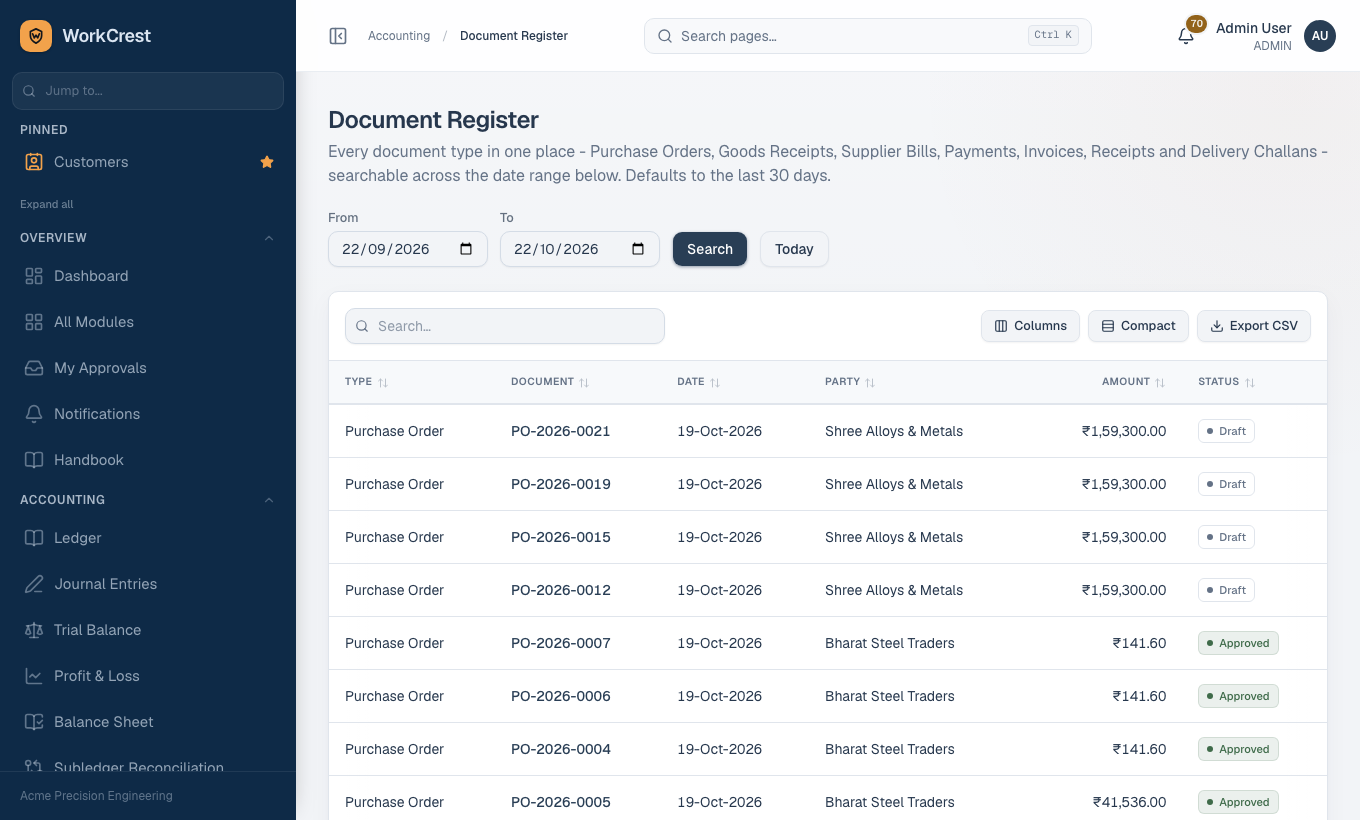
Document Register
Open . It puts seven kinds of document in one list so you can search across them: Purchase Orders, Goods Receipts, Supplier Bills, Payments, Invoices, Receipts and Delivery Challans. Newest first.
- Period: From and To boxes with Search and Today buttons. The default is the last 30 days, not the financial year, because this history can be large.
- Columns: Type, Document (click to open it), Date, Party, Amount, Status.
- Date used: order date for POs, receipt date for goods receipts and receipts, bill date, invoice date, challan date, and the planned payment date for payments.
- Amount: goods receipts and delivery challans have no money value, so they show a line count (for example "3 lines").
- Status: for a receipt it reads Allocated or Unallocated depending on whether the whole receipt has been applied to invoices.
- Use the table search to find a number or a party across all types. Export CSV downloads the register as
transactions-report.
The rest of the business reports
These share the same Period box (and the business ones share its default of this financial year).
| Report | What it shows | Columns and notes |
|---|---|---|
| GST Summary | Month by month: output GST on issued invoices less issued credit notes, against input GST on approved supplier bills. A negative net payable is credit carried forward. | First column is Month. A working summary for GSTR-3B, not a filing. |
| HSN Summary | Outward supplies grouped by the HSN/SAC code saved on each issued invoice line, for the GSTR-1 HSN table. Before credit notes. | Columns include HSN / SAC and Invoices. |
| Sales Register | Every issued invoice, with issued credit notes as negative rows, so the footer is net outward supply. B2B means the customer has a GSTIN, B2C means none, Export means a foreign-currency invoice. | Date, Document, Type, Against, Customer, GSTIN, Category, Place of supply, then amounts. A GSTR-1 working list; the B2C-large threshold is not applied. |
| ITC Register | Input tax on approved supplier bills, bill by bill. A supplier with no GSTIN on file is flagged because the credit cannot be claimed without it. | Bill date, Bill, Supplier, Supplier GSTIN, Supplier invoice, Invoice date, Status, then amounts. |
| Credit Utilisation | Open receivables per customer against the credit limit on the customer master. A limit of zero means no limit is set. | Customer, Credit limit, Outstanding, Overdue, Available, Used. |
Orders, purchasing and production reports
| Report | What it shows | Columns and notes |
|---|---|---|
| Open Order Book | Confirmed sales orders with quantity still to dispatch, valued in rupees at each order's own rate before GST. Expected date is the line's ship date, else the order's expected delivery. Return orders and service lines are left out. | Order, Customer, Item, Ordered, Delivered, Open qty, Expected, Overdue, Open value. |
| On-time Delivery | Sales-order lines whose scheduled ship date falls in the period, against the day the full quantity had been dispatched on delivery challans. A line not yet fully dispatched is Overdue once its date has passed. The percentage counts only lines that are due. | Scheduled, Order, Customer, Item, Ordered, Dispatched, Fully dispatched on, Days late, Status. |
| Supplier Delivery | Approved PO lines with an expected date: the day the cumulative received quantity reached the ordered quantity, measured at receipt, before inspection. Service lines are left out. | Line view: Expected, PO, Supplier, Item, Ordered, Received, Fully received on, Days late, Status. Supplier view: PO lines, On time, Late, Overdue, On-time %, Avg days late. |
| Purchase Price History | For each part and supplier, the first, latest, lowest and highest price on PO lines. | Part, Supplier, POs, First price, Latest price, Lowest, Highest, Change. |
| Completed Operations | Shop-floor output by job, by assembly or by operation, chosen with the group tabs (?by=job, assembly, operations). | Includes Job, Assembly, Job quantity, Operations completed, Output (furthest step), Scrap, Step, Operation, Quantity. |
| Stock Valuation | Own stock at each part's standard cost. Stock with no issue for more than the dead-stock limit, or never issued, is flagged slow or dead. The receiving bay is excluded. | Part, Warehouse, Qty on hand, Unit cost, Value, Last issued, Days idle, Status. It is built on cost, so it sits in its own area for Accounts. |
Pricing reports
| Report | What it shows | Columns |
|---|---|---|
| Price Revisions | Every time a line's price was re-worked after it was first set (for example formula re-pricing at confirmation or dispatch). Impact is (new minus old) times quantity, converted to rupees at the order's rate. | Date, Order, Customer, Part, Phase, Old price, New price, Change %, Quantity, Impact (INR), Status. |
| Price Overrides | Where someone typed a price different from the part's selling price. | Date, Type, Document, Customer, Part, Quantity, Saved price, Part selling price, Difference %, Entered by, Reason. |
| Index Rates | Movement of the index rates used by pricing formulas in the period, with a list of the individual rates. | Index, Name, Unit, Rates in period, First rate, Latest rate, Latest date, Change %; detail: Date, Rate, Source. |
Quality reports
Quality report () shows first-pass yield, a defect Pareto, NCR ageing and a CAPA summary.
- Tiles: lots decided, first-pass yield, open NCRs, open CAPAs and overdue actions.
- Cost of poor quality is shown only to people with view-costs.
Supplier Quality () rates each supplier, by supplier or by supplier and part (?by=supplier or part).
- Columns: Receipts, Received, Rejected, Reject %, ppm, NCRs, Concessions, On-time %, Score, Rating and Alert.
Accounting reports
| Report | What it shows | Notes |
|---|---|---|
| Ledger | Every accounting entry posted by any module: bills, payments, invoices, receipts, stock, returns and notes, one line per debit or credit. Pick an account for a running balance. | Manual journals are at . |
| Trial Balance | All ledger accounts as of today, with Code, Account, Type, Debit, Credit, Net Balance. Includes only entries posted since the ledger went live. | It links to the Subledger Reconciliation for the Payable and Receivable rows. |
| Profit & Loss | Income minus Expense across the date range, shown by Section, Code, Account and Amount. | Defaults to the last 30 days. |
| Balance Sheet | Assets against Liabilities plus Equity as of one date. | Retained earnings is computed as all-time income less expense up to that date. It is never posted, because the app has no period-close. |
| Subledger Reconciliation | Per party, the ledger balance for Accounts Payable or Receivable checked against the same party's document balance. Any non-zero Difference means a posting is missing or wrong. | Chase every difference before closing a month. |
| Open GRN Clearing | Per purchase order: goods received at PO price, less approved purchase returns, less supplier bills (net of debit notes). A positive Open amount is stock received but not yet billed. | Columns: PO, Supplier, Received, Returned, Billed, Open. |
Ageing, supplier ledger and customer statement
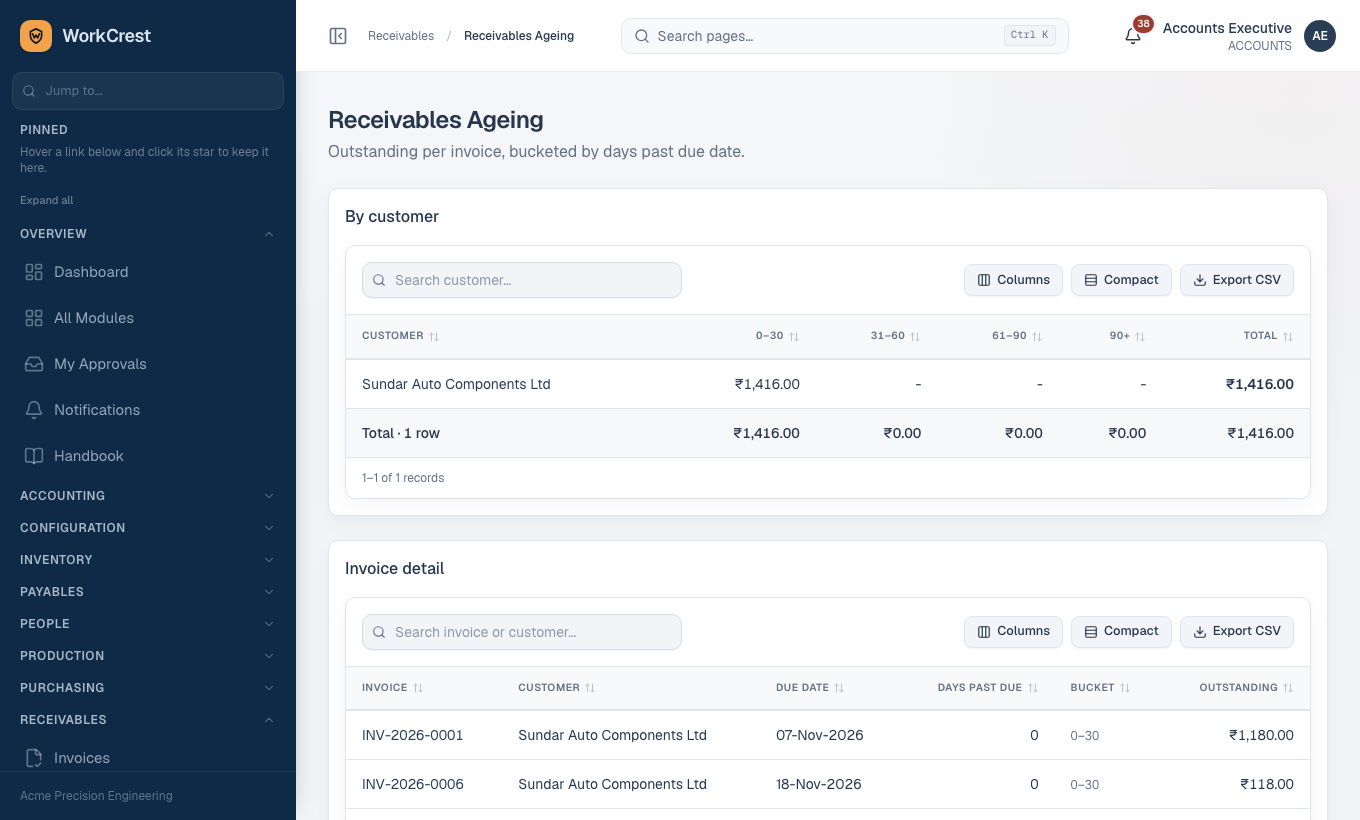
Receivables Ageing () lists what customers owe, split into buckets 0-30, 31-60, 61-90 and 90+ days.
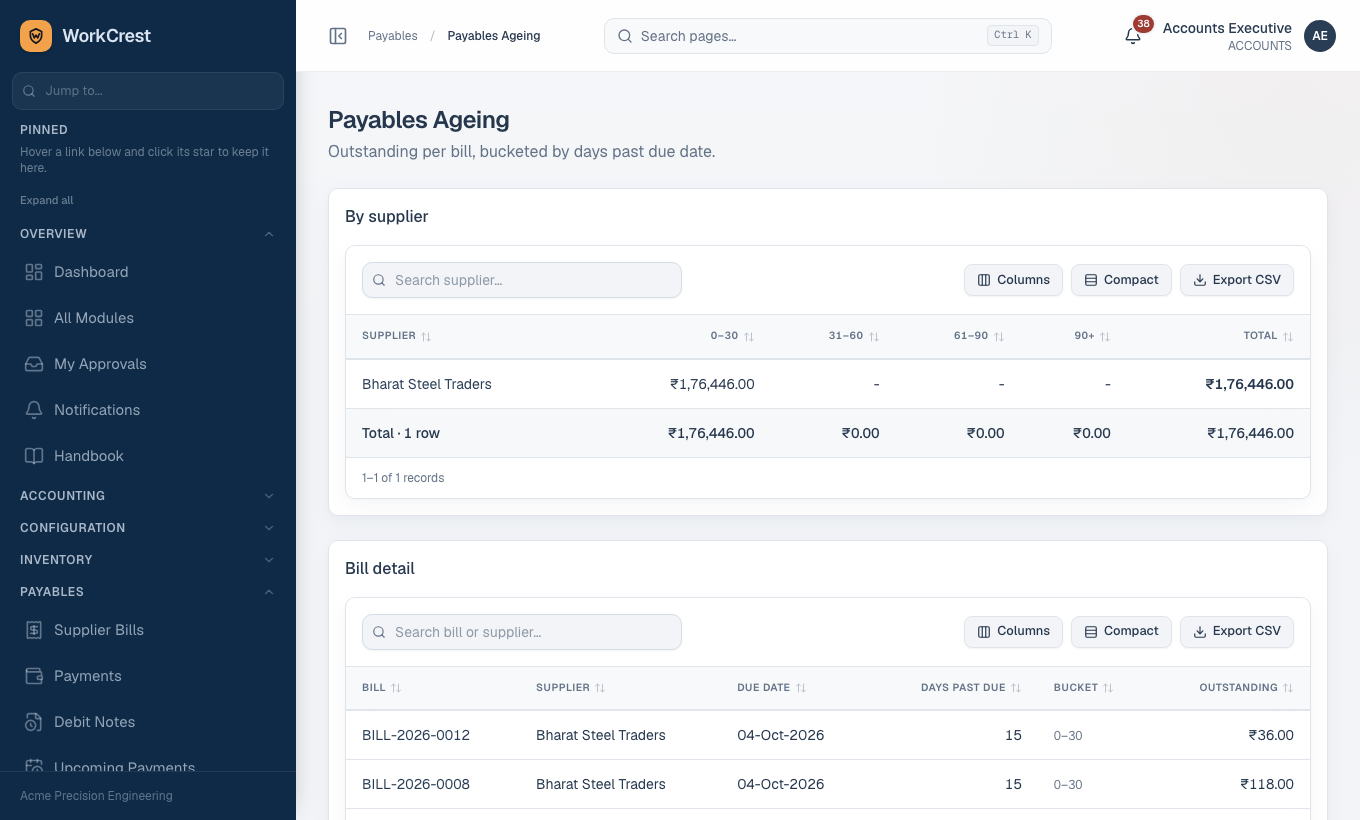
Payables Ageing () does the same for what you owe suppliers.
Each report has three parts:
- A summary by party.
- A detail list by document, with Due date, Days past due, Bucket and Outstanding.
- A list of unapplied advances, with Payment, Paid on and Unapplied.
Each table exports separately. There is no date selector: they show the position today.
Open a party from either ageing report to see the customer statement or supplier ledger: a chronological list with a running balance, so it is not sortable.
Read these before you rely on a number
- Working summaries, not filings. The GST Summary, HSN Summary, Sales Register and ITC Register help you prepare returns. They are not the returns.
- Not modelled: debit notes in the GST figures, reverse charge, and ITC eligibility rules (blocked credits, GSTR-2B matching).
- Analysis reports are before credit and debit notes.
- Only issued or approved documents count. Drafts and pending items are left out.
- Costs are private. Standard-cost columns need view-costs.
Common mistakes
- Wrong period. Reports default to this financial year (or the last 30 days for the Document Register and Profit & Loss). A number that looks low may just be a short period. Check the From and To boxes first.
- Forgetting to press Apply. Changing a date does nothing until you click Apply (or Search on the Document Register).
- Comparing sales analysis with the Sales Register. One is before credit notes, the other is net of them. They will differ.
- Expecting a Draft to show up. Issue the invoice or get the bill approved first.
- Reading Collection Days as "who owes us". It measures money already received. Use Receivables Ageing for overdue balances.
- Expecting cost columns. If Scrap value or Returned value is missing, you lack view-costs.
- Looking for Quality reports when the module is off. They are removed for everyone.
- Treating an export as a filing. Review with your accountant before uploading anything to the GST portal.