Training home / Process walkthroughs
Procure to pay
From a purchase order to money leaving the bank, across Procurement, Plant, Quality and Accounts.
At a glance
- The flow: PO draft → PO approval → GRN (+ inspection) → Supplier bill → Bill approval → Payment → Mark paid.
- Who is involved: Procurement, Plant Head or other approvers, store, Quality, and Accounts.
- Watch out for: A bill is refused as over-billing if its quantity exceeds what was received, so receive the goods first.
PO draft→PO approval→GRN (+ inspection)→Supplier bill→Bill approval→Payment→Mark paid
Stage table
| # | Stage | Who (role) | Screen | What happens | Posts to stock / GL |
|---|---|---|---|---|---|
| 1 | Purchase order | Procurement | Create a Draft PO and submit it. It goes through the approval engine by amount band. | Nothing. | |
| 1a | Blanket agreement and release (optional) | Procurement | A standing, price-committed deal per part with volume price breaks. The agreement is approved once; each Release creates a normal Draft PO that needs its own PO approval. | Nothing. | |
| 2 | Approval | Approver named by the rule (e.g. Plant Head, Admin) | Approve or reject. Approved POs can be printed and received against. | Nothing. | |
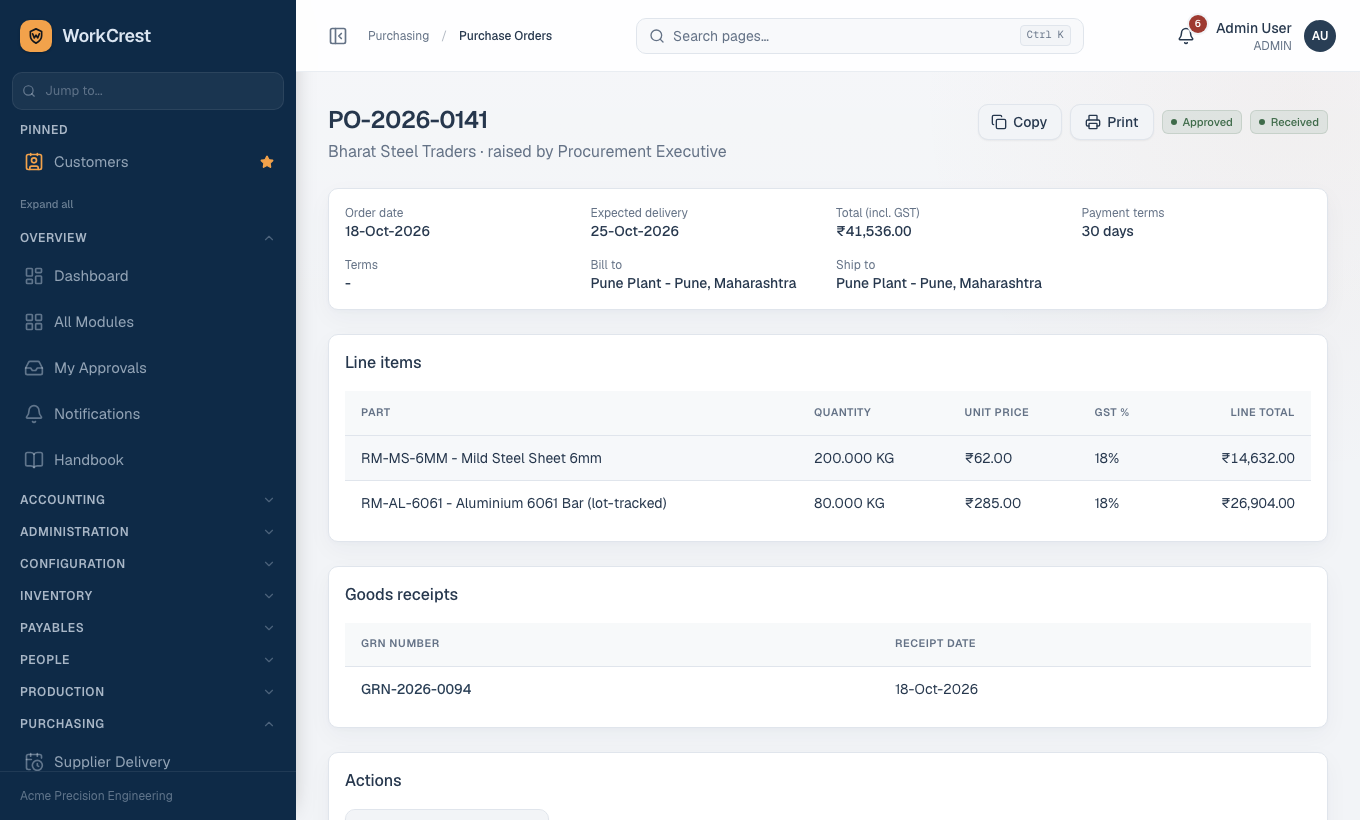
| 3 | Goods receipt (GRN) | Procurement / store | Record what arrived. GRN is auto-approved because authorisation happened at the PO. A part with receipt routing Direct goes straight to stock; Inspection parks the whole quantity in the Receiving warehouse until it is released. | Stock in (accepted qty). GL: Dr Inventory (or Inventory Receiving for inspection parts) / Cr GRN Clearing at PO price. | |
| 4 | Receiving inspection | Quality | Where the part has an active RECEIPT inspection plan, an inspection lot is created. Deciding the lot releases accepted quantity to stock; rejected quantity moves to Quarantine and raises an NCR. | Stock Receiving to warehouse; rejects Receiving to Quarantine. | |
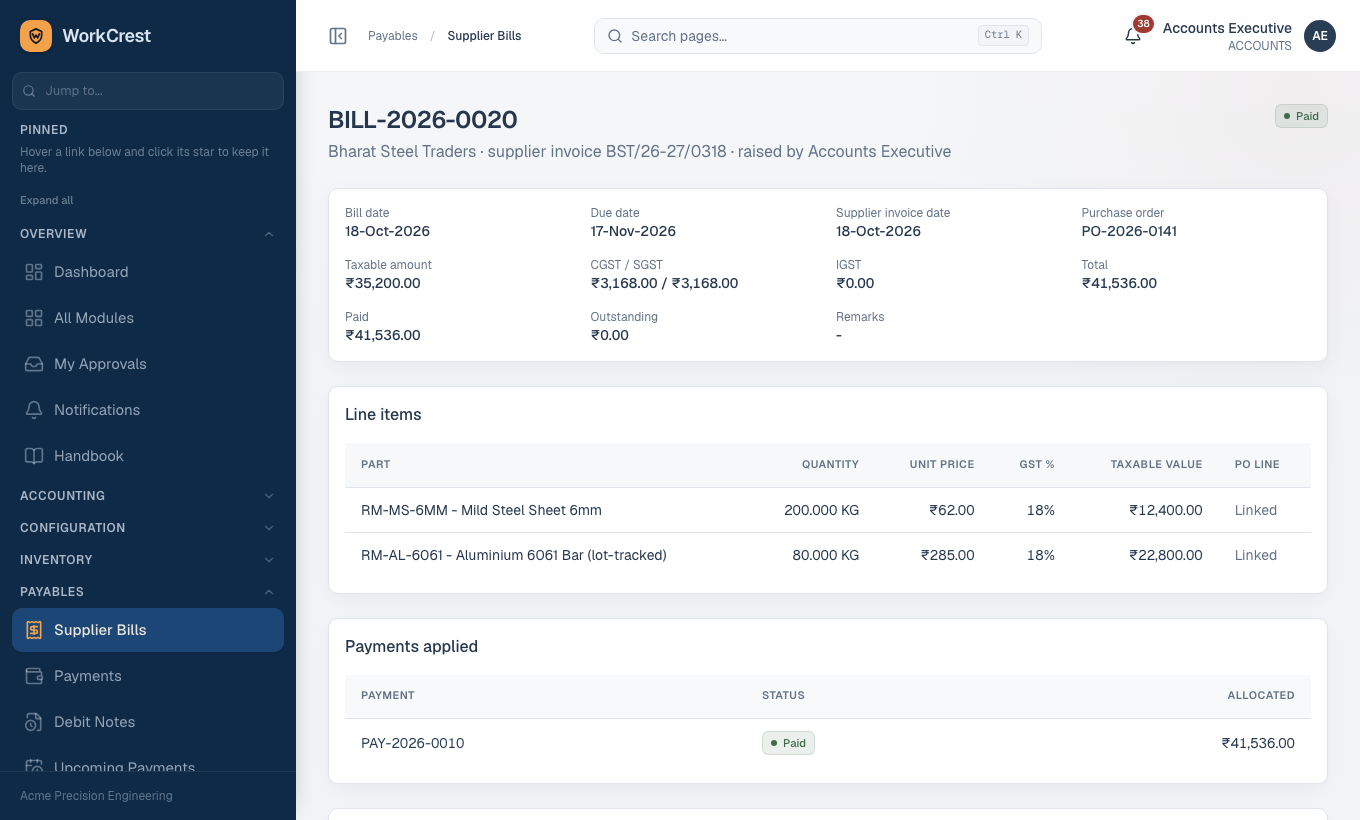
| 5 | Supplier bill | Accounts | Enter the bill as a Draft against the PO. GST is split once at creation. The bill is matched to what was received (three-way match); over-billing and billing before receipt are refused. | Nothing yet. | |
| 6 | Bill approval | Plant Head (up to Rs 50,000), also Admin above | Only when the decision reaches Approved does the bill post. | GL: Dr GRN Clearing (plus Purchase Price Variance) for received stock, or the default expense for a non-PO bill; Dr Input GST / Cr Accounts Payable. | |
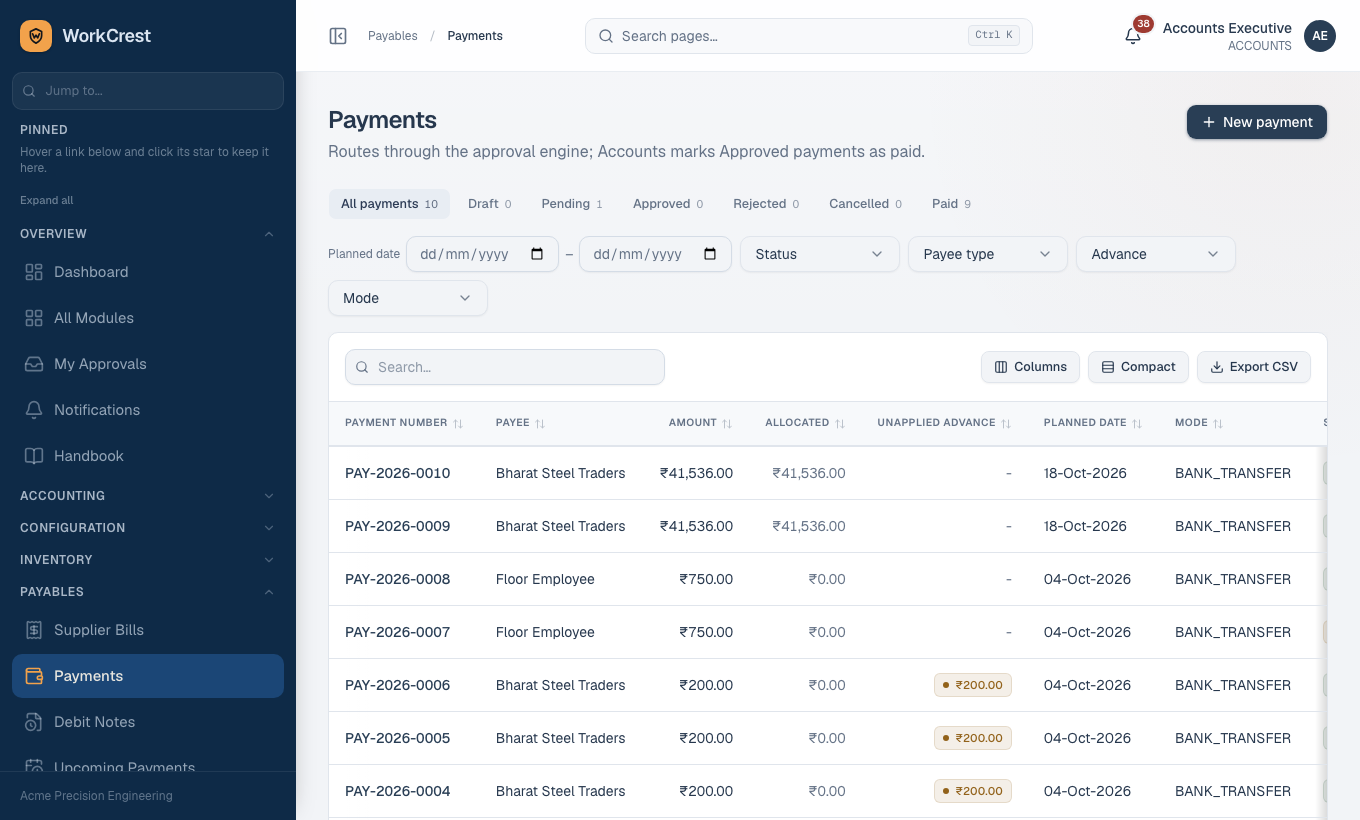
| 7 | Payment | Accounts | Create a payment against a supplier and its bills; it routes through the approval engine. | Nothing until mark paid. | |
| 8 | Mark as paid | Accounts | The separate "mark as paid" step. Bill paid amount and status move only here. | GL: Dr payable / Cr bank. Bill becomes Partially paid or Paid. | |
| 9 | Returns and debit notes | Procurement, Accounts | , | Send goods back (approval needed), then a debit note fixes the money. | Stock out and the reversing GL entries on approval. |
Things worth knowing at each stage
Purchase order
- Two separate statuses. Approval status and fulfilment status move independently.
- Fulfilment follows GRNs. A PO moves Open, Partially Received, Received as GRNs post.
- Editing an approved PO creates a version and sends it back for approval.
- Deleting. Only a Draft with no history can be deleted.
- Cancelling. Anything else is cancelled with a reason. This stops further GRNs and bills.
Approved Supplier List: once a part has an approved supplier entry, a PO to a supplier who is not approved and in good standing is blocked. Only an Admin can override, and must give a reason. Service parts and blanket release POs are exempt.
Blanket releases
- Price tier comes from each release's own quantity, not cumulative history.
- Quantity is reserved when the release is created.
- Given back if that release PO is rejected or cancelled.
- Amending an approved agreement resets it to Draft. New releases stay blocked until it is re-approved.
Goods receipt, service lines and GRN clearing
- Service parts need no stock. A GRN is optional and only advances the received quantity. The cost is recognised at the bill.
- Outside processing lines linked to a job step need a GRN. It completes the step.
- GRN Clearing account holds the value of goods received but not yet billed. lists what is still open.
Bill and payment
- Bill approval. A bill passes through Draft, Pending and Approved before it counts in any ageing, payment picker or ledger.
- Bill payment status is separate: Open, Partially paid, Paid, Cancelled.
- Payments pass through Draft, Pending, Approved, then Paid (or Rejected / Cancelled).
- Advance payments. A payment made before the bill leaves an unapplied advance. Accounts can apply it to a later bill.
Approvals involved
- Purchase order and blanket agreement (and each release PO separately).
- Supplier bill.
- Payment.
- Purchase return.
- Quality concession (use-as-is on a rejected receipt).
- Approved Supplier List qualification.
The GRN itself does not use approval. See Approvals.
What can go wrong
Bill refused as over-billing: the bill quantity exceeds received (or reserved by other bills). Receive the goods first, or reduce the bill. Draft, Pending and Approved bills all reserve quantity; Rejected and Cancelled ones release it.
Stock not showing after a GRN: if the part is routed Inspection, it sits in Receiving until Quality decides the lot. Receiving and Quarantine warehouses are excluded from available stock.
PO blocked on supplier: the supplier is not approved or is on hold for that part on the Approved Supplier List.
Approver is the submitter: self-approval is blocked unless an Admin turned it on in Instance Settings.
Related pages
Training home · Cheat sheets · Sales · Procurement · Plant · Accounts · Quality · HR and employees · Admin